Setec: A Sky Console for a Small Telescope
A read-only web page that answers one question before I carry the telescope outside: is tonight worth it? Twilight, Moon, cloud and seeing, what's up, what the mount is doing, and the last thing I imaged.
I have a Celestron NexStar 4SE. It’s a small Maksutov on a computerised alt-az mount, the kind of scope that gets bought for “the planets and the Moon” and then spends most of its life in a closet because the question is tonight any good? is annoying to answer. You check one app for cloud, another for the Moon, a third for what’s actually above the trees, and by the time you’ve done that the enthusiasm has drained out.
So I built Setec, and it ended up in two halves. The first is a terminal app that talks to the mount. The second, the one this post is about, is a web page that sits on my homelab’s always-on box and answers the question for me.

The verdict
The top of the page is a single line. GO, MARGINAL, NO-GO, or, during the day, the sky state and when it gets dark. The rule behind it is deliberately dumb:
- dark, cloud 3/8 or less, and the Moon either down or under 40 % lit → GO
- thin cloud, a bright Moon, or no forecast at all → MARGINAL
- cloud 7/8 or more → NO-GO
Every verdict carries its reason: “seeing 4/8 · dew risk high at 125 % rh” tells me more than a green light would. The six tiles under it are the inputs: sky state and when astronomical dark starts, Moon illumination and whether it’s up, 7Timer’s cloud, seeing and transparency, temperature with a dew flag, and how many catalogue objects are currently above 5°.
The forecast is 7Timer’s astronomy run, which is free, has no API key, and is built for exactly this. It refreshes every half hour. Everything else the page shows is computed locally.
Its own ephemeris
I didn’t want the page to depend on a service for where the Sun, Moon and planets are, so Setec carries its own ephemeris. It’s Meeus, mostly: the Sun to a hundredth of a degree, the Moon to a tenth, the planets close enough to put a dot in the right place on a chart. From that it derives sunset, the three twilights, the dark window, Moon rise, set and transit, and the altitude and azimuth of every object in a 112-entry catalogue of planets, Messier and NGC targets and alignment stars.
The whole thing is one Python file with no dependencies beyond the standard library. The web console imports it, so the page and the terminal app never disagree about the sky.
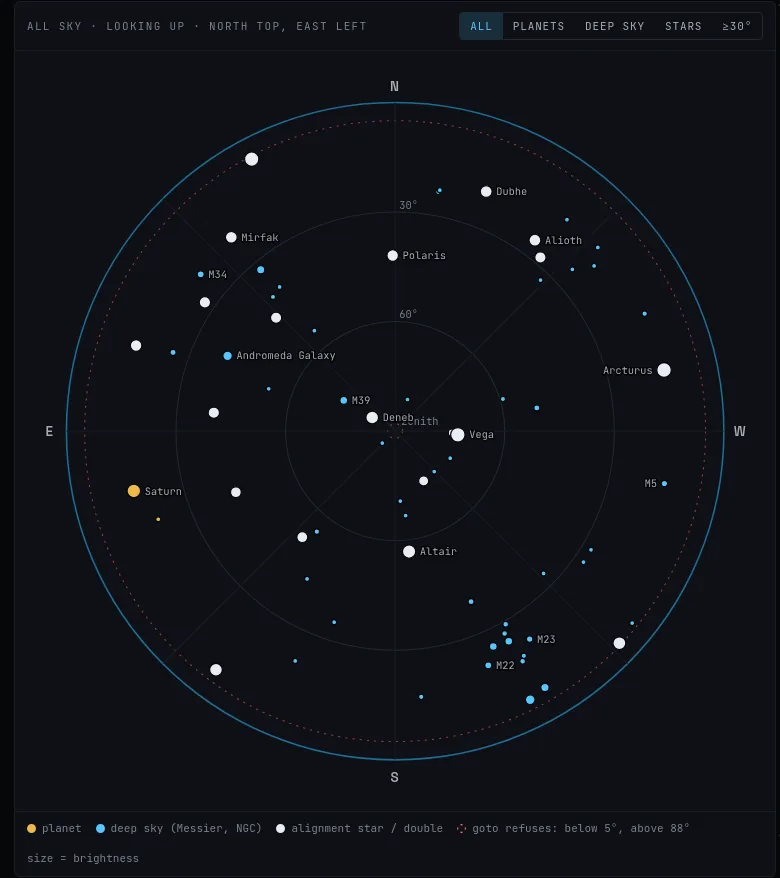
The chart is drawn looking up, north at the top, east on the left, the way the sky actually is when you tilt your head back. Dot size is brightness. Yellow is a planet, blue is deep sky, white is an alignment star. The red dotted ring is the 5° floor where the mount refuses a goto. Filters along the top narrow it to planets, deep sky, stars, or only what’s above 30°, which on a 4SE is the honest list.
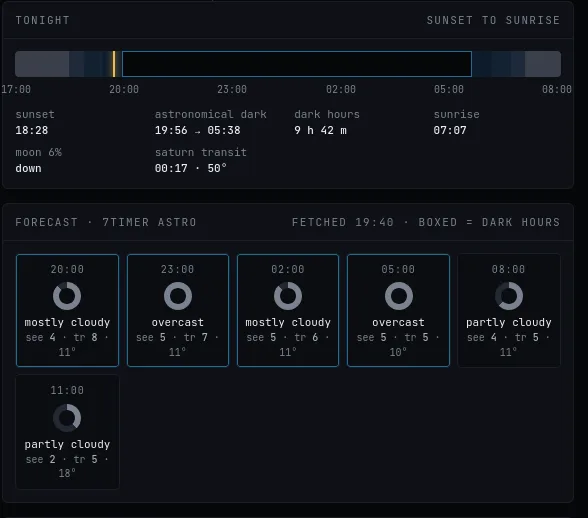
The timeline runs sunset to sunrise with the twilight bands shaded and a marker for now, with the Moon’s state and tonight’s planet transit written under it. Below that, the forecast slots that fall inside dark hours get a box, because a clear 2 pm doesn’t help.
The mount, probed, never held
The 4SE has a SkyPortal WiFi module, and the mount’s AUX protocol is open enough that the terminal half of Setec can align, goto and track over it. The catch is that the module accepts one client. If the console held the connection, the terminal app and Celestron’s phone app would both be locked out.
So the console probes. Every 30 seconds it opens a socket, asks for the firmware and both encoder positions, and closes again, all inside a second. The mount panel shows the link, firmware, the encoders as azimuth and altitude, and when it was last checked. “IN USE” means something else has the port, which is usually me at the eyepiece. The goto buttons on the page are drawn but disabled on purpose. I haven’t done a real-sky alignment with the terminal app yet, and driving a telescope from a browser before that works is how you walk into a tripod in the dark.
Tonight’s plan
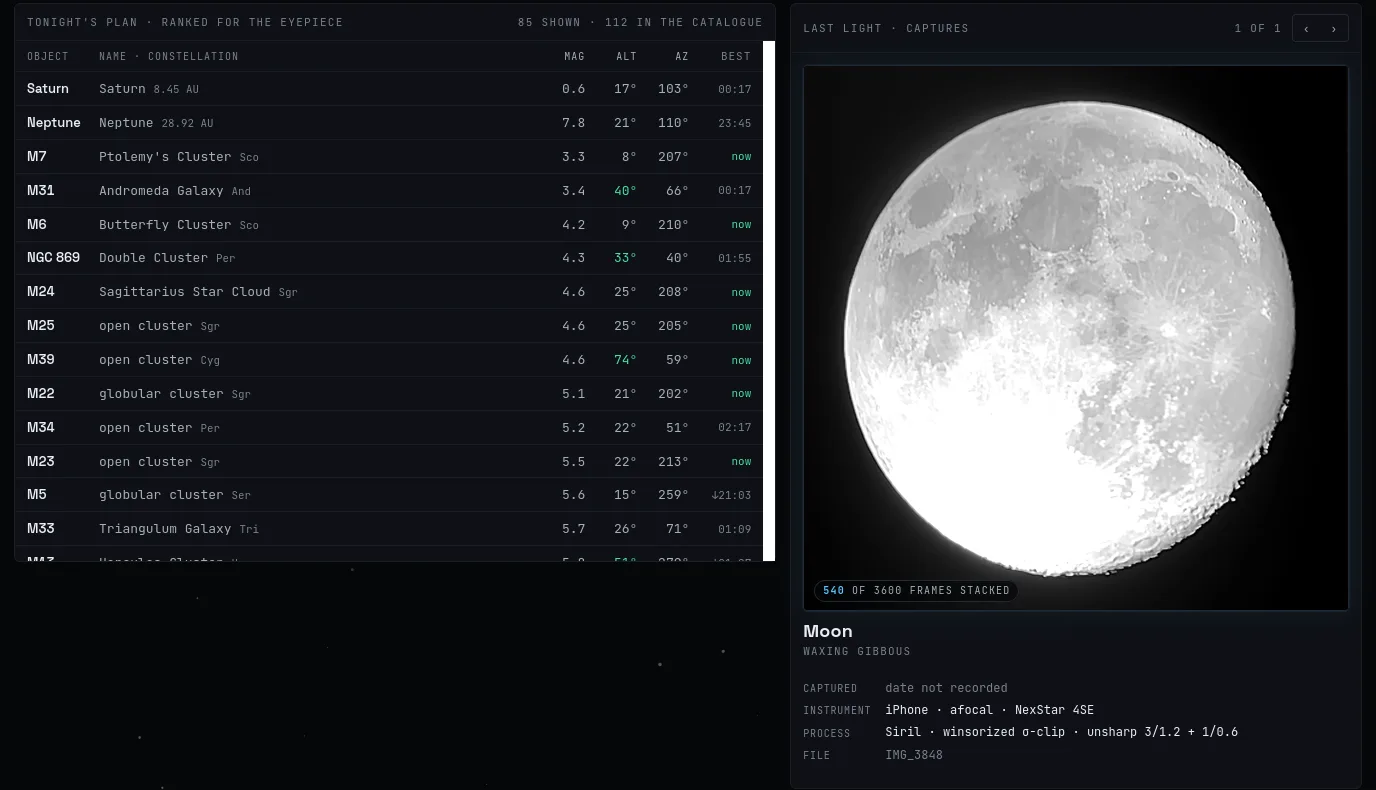
The bottom left is the catalogue, ranked for the eyepiece: brightest first, with altitude, azimuth and when each object is best, either “now” or the time it transits. Anything below the horizon that rises within a few hours stays on the list so I can plan around it. Click a row and the chart highlights it.
Last light
The bottom right is the newest part. It shows the last thing I actually imaged, with how it was made. The first entry is the Moon, waxing gibbous, shot with an iPhone held to the eyepiece on an adapter, recording video rather than photos. I cut the sharpest two minutes out of the clip, kept the best 540 of 3,600 frames, aligned them, and stacked them in Siril with winsorized sigma clipping and a little unsharp masking. A phone through a 4-inch Maksutov has no business looking that good, and the trick is entirely the stack: one frame is soft and boiling, 540 of them averaged are not.
The panel is fed by a folder on the server. Drop in a PNG and a small JSON sidecar with the object, date, instrument and frame counts, and it appears within 30 seconds. The images are served only from that folder, by name, nothing else.